लेखक: रविंद्र पारधी (Founder, Marathi AI Prompts) | शेवटचे अपडेट: ऑगस्ट 2026 | वाचनासाठी वेळ: 8-10 मिनिटे
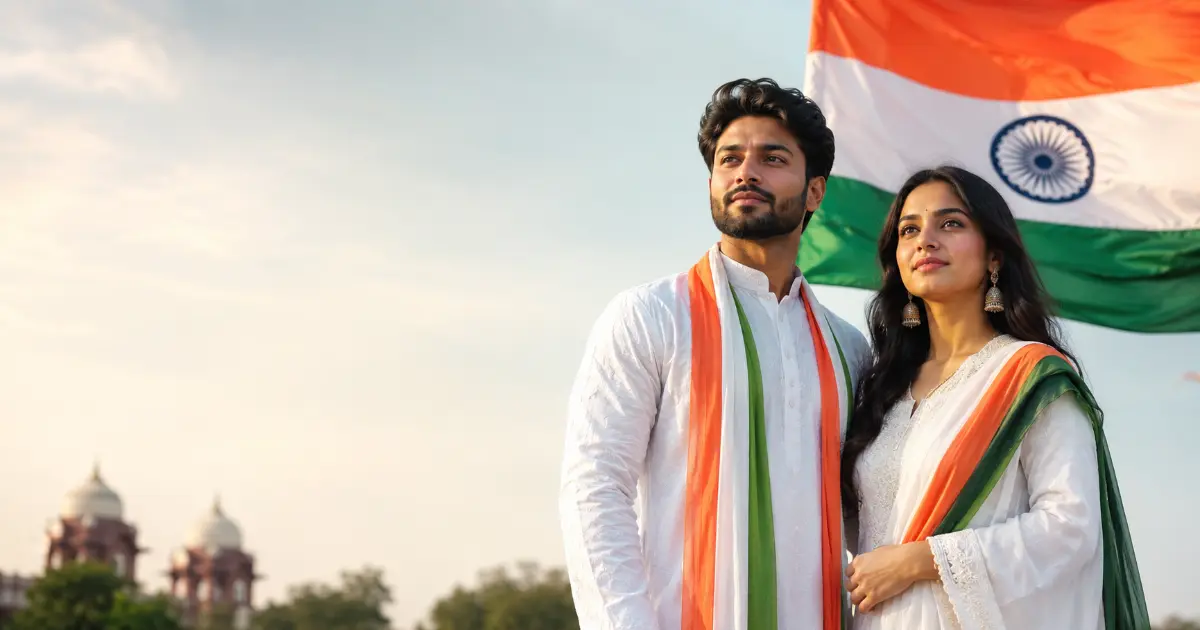
15 August जवळ येताच, आता अनेक जण नुसता फोटो शेअर करण्याऐवजी 15 august ai photo prompts वापरून आपला फोटो खास patriotic लूकमध्ये बदलत आहेत. ChatGPT सारख्या AI टूलमध्ये तुमचा फोटो अपलोड करून योग्य prompt दिला, की तिरंगा background, Red Fort theme किंवा cinematic Independence Day poster अशा वेगवेगळ्या स्टाईलमध्ये सुंदर फोटो तयार येतात. योग्य prompt वापरल्यास चेहरा, facial features आणि hairstyle शक्य तितके तसेच ठेवून फक्त background, outfit आणि lighting मध्ये बदल करता येतो.
2026 मध्ये 15 august ai photo editing prompts चा वापर आता फक्त background बदलण्यापुरता मर्यादित राहिलेला नाही. यात नावासकट patriotic posters, cinematic portraits, तसचं Instagram किंवा WhatsApp Status साठी vertical फोटोसुद्धा तयार करता येतात. या लेखात मुलांसाठी, मुलींसाठी, couples साठी, name poster साठी आणि मराठीत वापरता येणारे असे अनेक Independence Day AI photo prompts दिले आहेत.
तुम्हाला स्वत:चा 15 August फोटो AI च्या मदतीने तयार करायचा असेल, तर खालील prompts थेट copy करून वापरता येतील. patriotic theme शिवाय तुम्हाला ट्रेंडिंग 3D AI Prompts मध्येही रस असेल, तर तेही आमच्या वेबसाइटवर उपलब्ध आहेत.
चला, सुरुवात करूया. आधी पाहूया, 15 August AI Photo Prompts म्हणजे नेमके काय आणि ते कसे काम करतात.
या लेखात काय आहे (Quick Navigation):
- 15 August AI Photo Prompts म्हणजे काय?
- ChatGPT वापरून 15 August AI Photo कसा तयार करायचा?
- Best 15 August AI Photo Prompts 2026
- 15 August AI Photo Prompts for Boys
- 15 August AI Photo Prompts for Girls
- 15 August AI Photo Prompts for Couples
- 15 August Name Poster AI Photo Prompt
- 15 August AI Photo Prompts in Marathi
- Face Unchanged ठेवण्यासाठी AI Prompt Tips
- Instagram & WhatsApp Status साठी AI Photo Prompt
- तुमच्यासाठी कोणता Prompt योग्य आहे?
- FAQ
15 August AI Photo Prompts म्हणजे काय?
सोप्या भाषेत सांगायचं, AI photo prompt म्हणजे तुम्ही ChatGPT, Gemini किंवा तस्तम AI image editing tool ला दिलेली स्पष्ट सूचना (instruction) , किंवा आदेश. या सुचनेच्या मदतीने अपलोड केलेल्या फोटोला एखादी ठराविक theme, style, background किंवा patriotic look देता येतो.
15 August साठी वापरले जाणारे prompts साधारणपणे तीन महत्त्वाच्या गोष्टी स्पष्ट करतात:
- Face/Identify: चेहरा, skin tone, hairstyle आणि facial features शक्य तितके unchanged ठेवण्यासाठी prompt मध्ये “keep my face unchanged”, preserve my exact facial features” किंवा maintain facial identity” यांसारख्या instructions वापरल्या जातात.
- Background: तिरंगा, Red Fort, India Gate, Ashoka Chakra किंवा patriotic mural यांसारखी background theme स्पष्टपणे सांगितली जाते.
- Outfit/Accessories: तिरंगा sash, हातातील भारतीय झेंडा, tricolor dupatta, traditional Indian outfit, किंवा इतर patriotic accessories यांचा उल्लेख केला जातो.
Prompt मध्ये हे तपशील जितके स्पष्ट असतील, तितकी AI tool ला अपेक्षित result समजण्यास मदत होते. त्यामुळे फक्त “make my photo patriotic” असा generic prompt देण्यापेक्षा face, background, outfit, lighting आणि एकूण style याबद्दल स्पष्ट सूचना देणे अधिक उपयोगी ठरते.
आता तुमचा स्वत:चा फोटो वापरून असा Independence Day AI photo टप्प्याटप्प्याने (step-by-step) कसा तयार करायचा ते पाहूया.
ChatGPT वापरून 15 August AI Photo कसा तयार करायचा?
Step 1: तुमचा Clear Photo Upload करा
ChatGPT ओपन करा आणि तुमचा एक स्पष्ट, front-facing फोटो अपलोड करा. चेहरा blur नसावा आणि चांगल्या lighting मध्ये काढलेला फोटो असावा, त्यामुळे AI ला तुमचे facial features अचूक ओळखता येतात आणि final result जास्त realistic येतो.
Step 2: योग्य 15 August AI Photo Editing Prompt निवडा
खाली दिलेल्या prompts पैकी तुम्हाला हवा तो (तिरंगा background, Red Fort theme, boy/girl/couple specific किंवा name poster) निवडा. तुमच्या गरजेनुसार (individual, family, social media status) योग्य prompt निवडणं सोपं जाईल.
Step 3: Prompt Copy करून ChatGPT मध्ये Paste करा
निवडलेला prompt जसाच्या तसा copy करा आणि अपलोड केलेल्या फोटोसोबत ChatGPT मध्ये paste करा. गरज वाटल्यास prompt मध्ये तुमचं नाव, आवडता रंग किंवा specific background detail टाकून थोडं customize करू शकता. (Prompt कसा लिहायचा/customize करायचा हे अधिक सविस्तर जाणून घ्यायचं असल्यास AI Prompt कसे लिहावे हे मार्गदर्शक उपयोगी ठरेल.)
Step 4: AI Photo Generate करा आणि गरज असल्यास सुधारणा सांगा
Prompt submit केल्यावर AI काही वेळातच फोटो तयार करेल. Result पाहिल्यावर जर चेहरा थोडा वेगळा वाटला, background अपेक्षेप्रमाणे नसेल किंवा lighting बदलायची असेल, तर पुन्हा साध्या भाषेत सुधारणा सांगू शकता, उदा. “background थोडं जास्त bright करा” किंवा “face आणखी original ठेवा.”
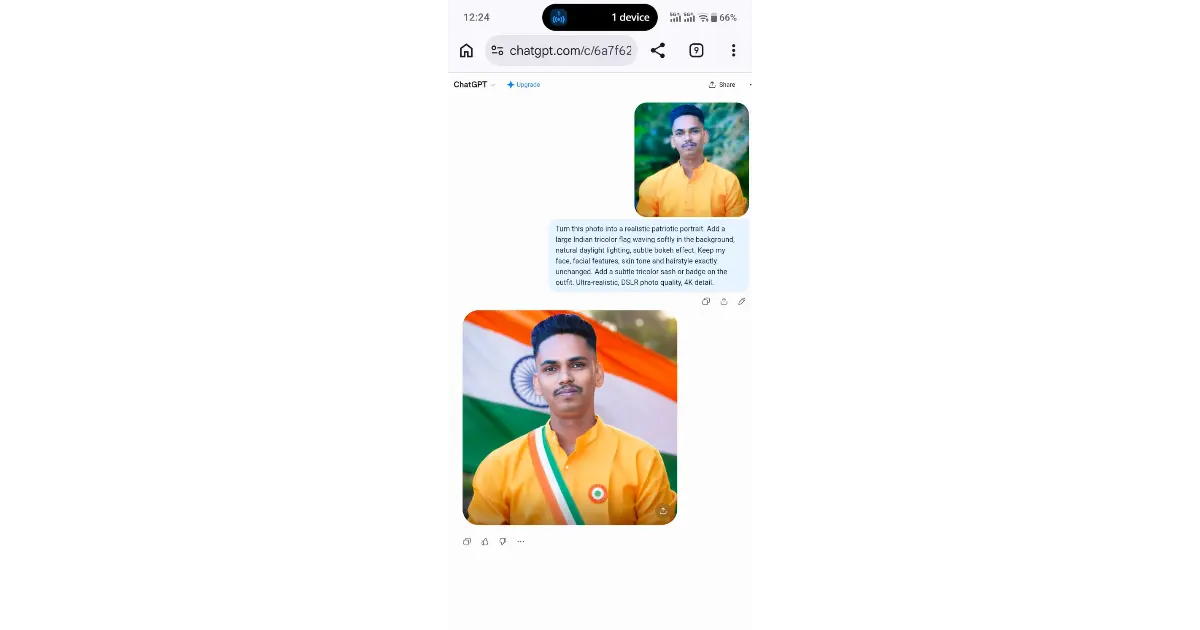
माझ्या testing मध्ये
मी हा prompt प्रत्यक्ष फोटोवर वापरून पाहिला. पहिल्या result मध्ये काही गोष्टी अपेक्षेप्रमाणे नसल्यास, AI ला पुन्हा स्पष्ट सूचना देऊन result सुधारता येतो. खालील screenshot माझ्या testing मधील एक उदाहरण आहे.
Step 5: Final Photo Save आणि Share करा
Result समाधानकारक वाटल्यावर फोटो डाउनलोड करा. Instagram किंवा WhatsApp Status साठी वापरायचा असल्यास योग्य आकाराचा (vertical 9:16) फोटो निवडून सेव्ह करा, जेणेकरून social media वर शेअर करताना तो क्रॉप होणार नाही. Result मध्ये extra fingers, distorted face किंवा अनावश्यक elements दिसल्यास, Negative Prompts वापरून अशा चुका टाळता येतात.
Best 15 August AI Photo Prompts 2026
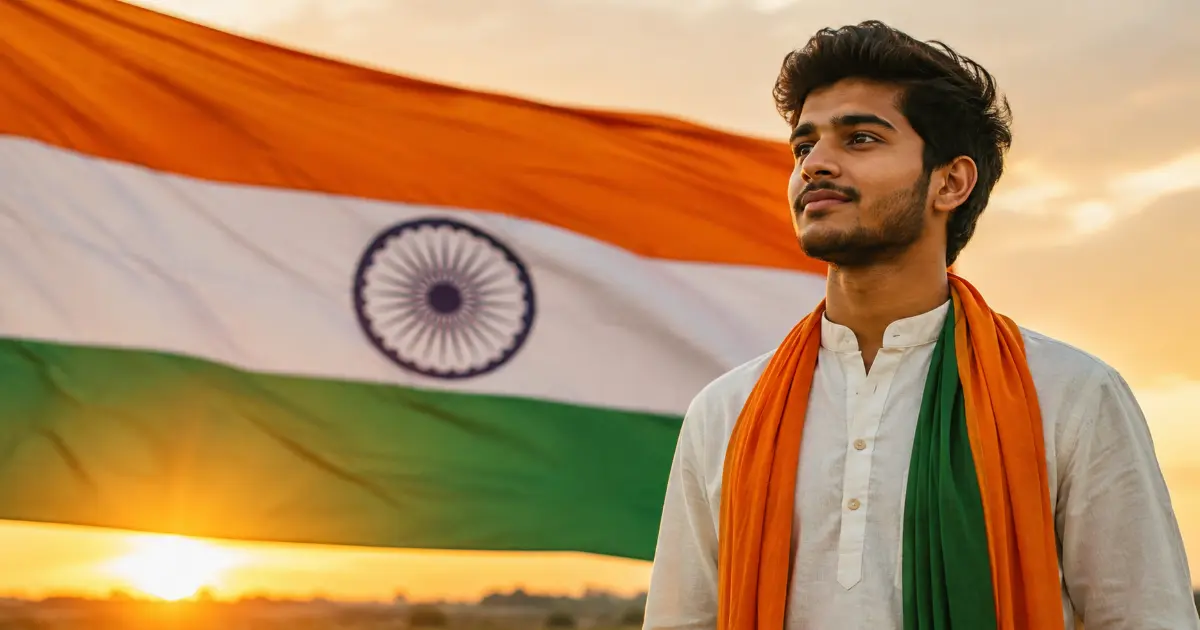
आता तुमचा फोटो अपलोड करून AI च्या मदतीने Independence Day theme तयार करण्यासाठी काही ready-to-use 15 august ai photo prompts पाहूया. खालील prompts मध्ये तिरंगा background, Red Fort, cinematic lighting, traditional Indian look आणि patriotic poster अशा वेगवेगळ्या स्टाईल्सचा समावेश आहे.
तुमच्या आवडीनुसार कोणताही prompt copy करून अपलोड केलेल्या फोटोसोबत वापरू शकता. प्रत्येक prompt मध्ये face आणि identity preserve करण्यासाठी आवश्यक सूचनाही दिलेल्या आहेत.
1. Realistic Indian Flag Portrait Prompt
Turn this photo into a realistic patriotic portrait. Add a large Indian tricolor flag waving softly in the background, natural daylight lighting, subtle bokeh effect. Keep my face, facial features, skin tone and hairstyle exactly unchanged. Add a subtle tricolor sash or badge on the outfit. Ultra-realistic, DSLR photo quality, 4K detail.
Best for: Individual profile photo किंवा साधा patriotic portrait हवा असल्यास. Tip: दिवसाच्या नैसर्गिक प्रकाशात काढलेला फोटो वापरल्यास background blending जास्त smooth येते.
2. Red Fort Independence Day Prompt
Edit this photo so I am standing in front of the Red Fort (Lal Qila), Delhi, during Independence Day morning with a clear blue sky and Indian flags fluttering nearby. Preserve my exact face, expression and hairstyle. Cinematic lighting, warm golden-hour tone, realistic photography style, no text on image.
Best for: Historical/iconic Independence Day setting हवा असल्यास. Tip: Front-facing, medium-distance फोटो वापरल्यास Red Fort background चांगल्या प्रकारे merge होतो.
3. Tiranga Background AI Photo Prompt
Create a patriotic photo using my uploaded picture with a soft tricolor (saffron, white, green) gradient background and a faint Ashoka Chakra watermark pattern. Keep my face 100% unchanged. Add subtle tricolor lighting reflection on my face for a premium poster-style look.
Best for: Simple, clean, poster-style patriotic look. Instagram DP साठी सुद्धा उपयुक्त. Tip: Solid-color outfit (पांढरा किंवा हलका रंग) वापरल्यास तिरंगा reflection अधिक ठळक दिसतो.
4. Cinematic 15 August Photo Prompt
Convert this photo into a cinematic Independence Day poster shot. Use dramatic lighting, slight lens flare, shallow depth of field, tricolor smoke effect in the background. Do not alter my facial structure, only enhance lighting and background. Movie-poster aesthetic, high detail, realistic skin texture.
Best for: Dramatic, movie-poster style हवा असणाऱ्यांसाठी. Tip: थोडा serious/confident expression असलेला फोटो या style ला उत्तम साजेसा दिसतो.
5. Traditional Indian Dress Independence Day Prompt
Edit my photo to add a traditional Indian outfit (kurta for men / saree for women) in tricolor-inspired colors, and I am standing with a small Indian flag in hand. Background: patriotic mural or flag wall. Keep my face, hairstyle and body proportions unchanged. Natural, realistic photography style.
Best for: Family किंवा independence day celebration photos साठी. Tip: Full-length किंवा upper-body फोटो वापरल्यास outfit change अधिक अचूक दिसतो. साडीमधील realistic look साठी आमचे साडी AI Prompts हे मारदर्शकही उपयोगी ठरेल.
15 August AI Photo Prompts for Boys
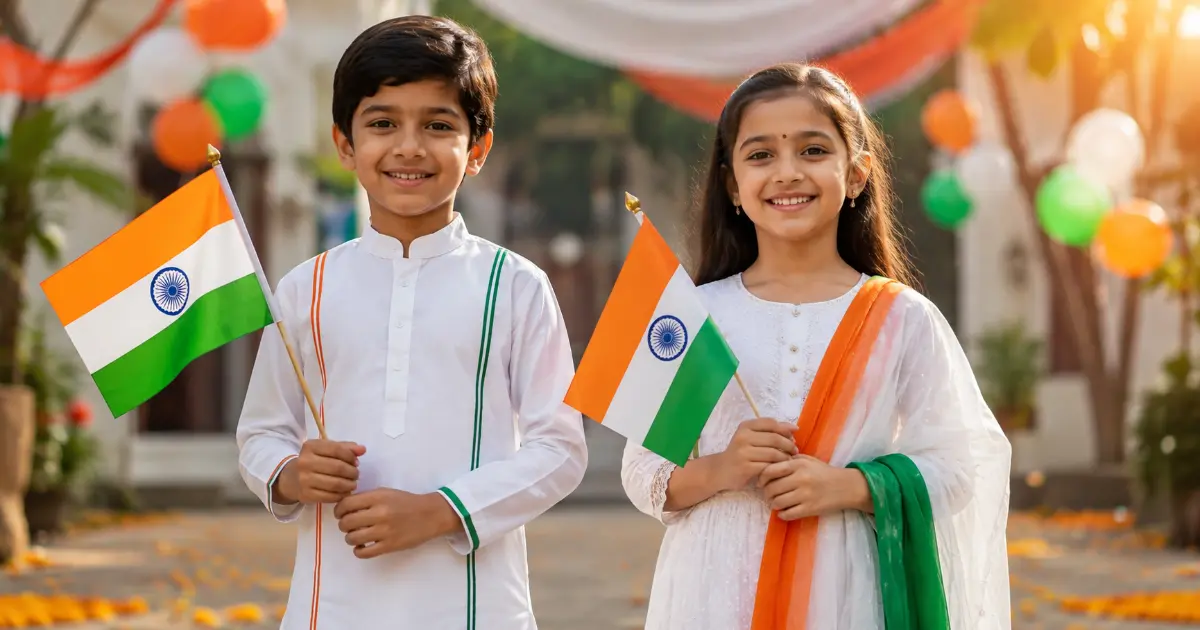
मुलांसाठी patriotic AI Photo तयार करताना pose, accessories आणि background थोडे वेगळे ठेवले, की फोटो confident आणि natural दिसतो. मुख्य prompt आणि 3 variations दिलेल्या आहेत.
Main Prompt
Turn this photo of a boy into a patriotic Independence Day photo. Add a tricolor flag in hand, tricolor wristband, and a proud confident pose against a soft flag-themed background. Keep the face, expression and hairstyle exactly the same. Bright natural lighting, realistic look.
Best for: Simple, confident individual patriotic photo.
Variation 1 — School Ground
Edit this photo so the boy is standing near a school ground with tricolor balloons and a flag in hand, cheerful expression, morning sunlight, realistic style. Keep the face, facial features, skin tone and hairstyle unchanged.
Best for: शाळेतील Independence Day celebration साठी.
Variation 2 — Kurta-Pyjama Salute Pose
Edit this photo with the boy wearing a white kurta-pyjama and a tricolor turban/cap, saluting pose, Red Fort background, cinematic lighting. Keep the face, facial features, skin tone and hairstyle unchanged.
Best for: Traditional, respectful, poster-worthy फोटो.
Variation 3 — Cycling with Flag
Edit this photo so the boy is cycling with a small Indian flag mounted on the bicycle, tricolor bunting in the background, candid realistic photo style. Keep the face, facial features, skin tone and hairstyle unchanged.
Best for: Candid, playful social-media-friendly शॉट.
15 August AI Photo Prompts for Girls
मुलींसाठी patriotic AI photo तयार करताना soft lighting, elegant accessories आणि traditional touch यामुळे फोटो अधिक आकर्षक आणि natural दिसतो. खाली मुख्य prompt आणि 3 variations दिलेल्या आहेत.
Main Prompt
Edit this photo of a girl into a patriotic look. Add a tricolor dupatta/sash, small flag accessory, and a soft tricolor bokeh background. Keep facial features, skin tone and hairstyle exactly unchanged. Soft natural lighting, elegant and realistic finish.
Best for: Elegant, soft patriotic individual portrait.
Variation 1 — Tricolor Salwar Suit
Edit this photo so the girl is wearing a tricolor-themed salwar suit, holding a flag, standing in a garden with soft bokeh, natural daylight. Keep the face, facial features, skin tone and hairstyle unchanged.
Best for: Garden/outdoor setting, soft daylight लूक.
Variation 2 — School Uniform
Edit this photo so the girl is in school uniform with a tricolor ribbon in her hair, holding a small flag, cheerful candid pose, bright lighting. Keep the face, facial features, skin tone and hairstyle unchanged.
Best for: शाळेतील Independence Day celebration साठी.
Variation 3 — Traditional Maharashtrian Look
Edit this photo with a traditional nauvari-inspired look, tricolor dupatta, Ashoka Chakra earrings, elegant patriotic portrait style. Keep the face, facial features, skin tone and hairstyle unchanged.
Best for: Traditional Maharashtrian patriotic पोर्ट्रेट, festival-special content साठी उत्तम. अशाच royal 8K style साठी महाराष्ट्रीयन सिनेमॅटिक पोर्ट्रेट AI प्रॉम्प्ट्स हा संग्रहही बघू शकता.
15 August AI Photo Prompts for Couples
Couples साठी patriotic AI photo मध्ये दोघांचाही चेहरा जसाच्या तसा ठेवणं सर्वात महत्त्वाचं असतं, त्यामुळे प्रत्येक prompt मध्ये दोघांसाठी स्पष्ट face-preservation सूचना दिलेली आहे. खाली मुख्य prompt आणि extra variations दिलेल्या आहेत.
Main Couple Prompt
Edit this couple’s photo into a patriotic Independence Day theme. Both are holding a small Indian flag together, standing close with a tricolor sunset background. Keep both faces exactly unchanged, only enhance lighting, background and add flag/patriotic elements. Realistic, warm cinematic tone.
Best for: Classic romantic patriotic couple photo, sunset setting.
Variation 1 — Tricolor Flag Shawl on Rooftop
Edit this photo so the couple is sitting on a rooftop at sunset, both wrapped in a large tricolor flag like a shawl, warm cinematic tone. Keep both faces, facial features and hairstyles exactly unchanged.
Best for: Cozy, cinematic rooftop-sunset मूड.
Variation 2 — India Gate Walk
Edit this photo so the couple is walking hand-in-hand at India Gate with tricolor kites in the sky, golden-hour lighting, realistic candid style. Keep both faces, facial features and hairstyles exactly unchanged.
Best for: Candid, iconic-location couple शॉट, Instagram-worthy.
15 August Name Poster AI Photo Prompt
फोटोवर स्वत:चं नाव किंवा खास मेसेज टाकून एक personalized patriotic poster तयार करायचा असेल, तर हा भाग त्यासाठीच आहे. WhatsApp status, Instagram post किंवा Facebook profile साठी हे poster-style prompts उत्तम काम करतात.
Main Name Poster Prompt
Create a patriotic poster using my photo with bold text overlay saying “HAPPY INDEPENDENCE DAY” and “15 AUGUST 2026” and “[YOUR NAME]” at the bottom in a clean modern font. Tricolor-themed background, Ashoka Chakra element, realistic photo blended with poster design. Keep my face unchanged.
Best for: WhatsAPP/Instagram/Facebook profile किंवा Independence Day post साठी झटपट शेअर करण्याजोगा poster.
Extra Variation — Certificate-Style Patriotic Poster
Create a certificate-style patriotic poster with my photo in the center, tricolor border, “PROUD INDIAN” text above, “[YOUR NAME]” and “15 AUGUST 2026” below, Ashoka Chakra emblem at top. Keep face unchanged.
Best for: अधिक formal/premium दिसणारा poster. शाळा, ऑफिस किंवा ग्रुप शेअरिंगसाठी योग्य.
दोन्ही prompts मध्ये [YOUR NAME] ही जागा तुमच्या स्वत:च्या नावाने बदलायची आहे, म्हणजे [YOUR NAME] ऐवजी थेट तुमचं नाव टाका.
टीप: AI कधी कधी text/नाव spelling मध्ये थोडी चूक करू शकतो, त्यामुळे poster generate झाल्यावर नाव आणि तारीख नीट तपासूनच पुढे शेअर करा.
15 August AI Photo Prompts in Marathi
जर तुम्ही 15 august ai photo prompts marathi मध्ये शोधत असाल, तर खालील prompts थेट मराठीत वापरता येतील. इतर सणांसाठी असेच भक्तिमय आणि पारंपारिक AI photo prompts हवे असल्यास गुरुपौर्णिमा AI Photo Prompts आणि वटपौर्णिमा एआय फोटो प्रॉम्प्ट्स हे संग्रहसुद्धा बघू शकता.
Prompt 1 — तिरंगा Background
माझा फोटो वापरून स्वातंत्र्यदिनाचा फोटो तयार करा. तिरंगा बॅकग्राउंड, हातात छोटा झेंडा, चेहरा जसाच्या तसा ठेवा, नैसर्गिक प्रकाश.
Best for: साधा, झटपट तयार होणारा patriotic फोटो.
Prompt 2 — महाराष्ट्रीयन Traditional Look
माझा फोटो पारंपरिक महाराष्ट्रीयन पेहरावात (नऊवारी/कुर्ता) दाखवा, पार्श्वभूमीला तिरंगा आणि अशोक चक्र, चेहरा बदलू नका.
Best for: पारंपारिक, सणासाठी खास patriotic पोर्ट्रेट.
Prompt 3 — School Independence Day
शाळेतील स्वातंत्र्यदिन कार्यक्रमासाठी माझा फोटो तिरंगा फुगे आणि झेंड्यासह तयार करा, हसरा चेहरा, चेहर्याची ओळख कायम ठेवा.
Best for: शाळेतील किंवा मुलांच्या Independence Day celebration साठी.
टीप: मराठी prompt वापरतानाही “चेहरा जसाच्या तसा ठेवा” किंवा “चेहऱ्याची ओळख कायम ठेवा” अशी सूचना स्पष्टपणे लिहा, यामुळे AI ला face-preservation सूचना नीट समजते आणि result जास्त अचूक येतो.
Face Unchanged ठेवण्यासाठी AI Prompt Tips
आतापर्यंतच्या जवळपास प्रत्येक prompt मध्ये face-preservation सूचना दिलेली आहे, कारण AI photo editing करताना ओळख (identity) जपणं सर्वात महत्त्वाचं असतं. खाली एक reusable prompt block, काही quick phrases आणि practical tips दिलेल्या आहेत, ज्या तुम्ही कोणत्याही prompt सोबत जोडू शकता.
Reusable Face-Lock Prompt
Keep my exact facial features, skin tone, eye shape and hairstyle completely unchanged. Do not alter face structure. Only modify background, clothing accents, and lighting.
Quick Reference Phrases
- Keep my face unchanged
- Preserve my exact facial features
- Maintain facial identity
- Do not alter my face
- Keep hairstyle and facial structure consistent
Practical Tips
- Clear, high-quality फोटो वापरा.
- चेहरा पूर्णपणे दिसेल असा फोटो निवडा.
- एकाच prompt मध्ये खूप मोठे बदल मागू नका.
- Result मध्ये चेहरा बदलला असल्यास पुन्हा स्पष्ट correction सूचना द्या.
Instagram & WhatsApp Status साठी AI Photo Prompt
Instagram Story, WhatsApp Status किंवा Facebook Story साठी वेगळा vertical format लागतो, जो mobile screen वर व्यवस्थित बसतो आणि क्रॉप न होता पूर्ण दिसतो. खाली दिलेला prompt खास याच गरजेसाठी तयार केलेला आहे. (Instagram DP AI Prompts मराठी हवे असल्यास तिथेही मिळतील.)
Main Status Prompt
Edit this photo into a vertical Instagram/WhatsApp status format (9:16) with a patriotic tricolor overlay, subtle Indian flag graphic in the corner, and soft “Happy Independence Day” text at the top. Keep my face and expression unchanged. Clean, shareable, mobile-optimized look.
Best for: Instagram Story, WhatsApp Status, Facebook Story.
Recommend Format: 9:16 vertical.
टीप: फोटो अपलोड करताना चेहरा/मुख्य subject फोटोच्या मध्यभागी (center) ठेवला, तर status/story साठी क्रॉप होताना महत्वाचा भाग कापला जाण्याची शक्यता कमी होते.
तुमच्यासाठी कोणता 15 August AI Photo Prompt योग्य आहे?
| तुमची गरज | योग्य Prompt |
|---|---|
| साधा patriotic portrait | Indian Flag Portrait |
| Red Fort background | Red Fort Prompt |
| Premium poster look | Cinematic Prompt |
| Traditional Indian look | Traditional Dress Prompt |
| मुलांसाठी फोटो | Boys Prompt |
| मुलींसाठी फोटो | Girls Prompt |
| Couple photo | Couples Prompt |
| नावासह poster | Name Poster Prompt |
| Marathi prompt हवा असल्यास | Marathi Prompts |
| Instagram/WhatsApp Status | 9:16 Status Prompt |
वरील table मधून तुमच्या गरजेनुसार योग्य prompt पटकन निवडता येईल, मग तो साधा portrait असो, traditional look असो किंवा social media status. एकदा योग्य prompt निवडला की तो थेट copy करून तुमच्या फोटोसोबत वापरता येतो.
वारंवार विचारले जाणारे प्रश्न (FAQ)
1. 15 August साठी कोणता AI Photo Prompt सर्वात चांगला आहे?
उत्तर: हे पूर्णपणे तुमच्या आवडीवर आणि गरजेनुसार बदलू शकते. जर तुम्हाला साधा आणि professional patriotic portrait लूक हवा असल्यास Indian Flag Portrait prompt सर्वोत्तम आहे. परंतु, जर तुम्हाला अधिक प्रिमियम किंवा सोशल मिडियासाठी आकर्षक poster लूक हवा असेल, तर Cinematic Prompt वापरणे जास्त फायदेशीर ठरेल. तुम्ही आमच्या या लेखातील “तुमच्यासाठी कोणता Prompt योग्य आहे” हा टेबल पाहून तुमच्या आवडीचा प्रॉम्प्ट निवडू शकता.
2. ChatGPT वापरून 15 August चा AI Photo कसा तयार करायचा?
उत्तर: हे अतिशय सोपे आहे! सर्वात आधी चॅटजीपीटी (ChatGPT) मध्ये तुमचा एक स्पष्ट आणि सरळ चेहरा असलेला फोटो अपलोड करा. त्यानंतर आमच्या marathiaiprompts.com वरील कोणताही एक प्रॉम्प्ट कॉपी करून तिथे पेस्ट करा. एआय फोटो जनरेट करेपर्यंत काही सेकंद थांबा. फोटो तयार झाल्यावर तो तपासून घ्या आणि गरज असल्यास बॅकग्राऊंड किंवा लायटिंग बदलण्यासाठी चॅटमध्ये पुन्हा सांगून सुधारणा करून घ्या.
3. या AI Prompts मध्ये स्वतःचा फोटो वापरता येतो का?
उत्तर: हो, नक्कीच! आम्ही दिलेले हे सर्व प्रॉम्ट्स युझर्सचा स्वत:चा अपलोड केलेला ओरिजिनल फोटो वापरण्यासाठीच खास डिझाईन केलेले आहेत. एक गोष्ट लक्षात ठेवा, तुमचा फोटो जितका स्पष्ट, समोरून काढलेल्या आणि चांगल्या प्रकाशात (Lighting) असेल, एआयचा रिझल्ट तितकाच जास्त रिअॅलिस्टिक आणि सुंदर येईल.
4. AI Photo तयार करताना माझा चेहरा जसाच्या तसा कसा ठेवायचा?
उत्तर: एआय बऱ्याचदा बॅकग्राऊंड बदलताना मूळ चेहरा देखील बदलून टाकतो. हे टाळण्यासाठी प्रॉम्प्टच्या शेवटी नेहमी इंग्रजीत “keep my face unchanged” किंवा “preserve my exact facial features” अशी स्पष्ट सूचना (Face-Lock Command) नक्की जोडा. यामुळे एआय तुमच्या कपड्यांमध्ये किंवा बॅकग्राऊंडमध्ये बदल करेल, पण तुमचा चेहरा सुरक्षित आणि नैसर्गिक ठेवेल.
5. Marathi मध्ये 15 August AI Photo तयार करता येतो का?
उत्तर: होय, तुम्ही मराठीत सुद्धा प्रॉम्ट्स देऊन फोटो बनवू शकता. जर तुम्हाला अस्सल महाराष्ट्रीयन संस्कृती दाखवणारा नऊवारी साडी किंवा फेटा लुक हवा असेल, तर आमच्या लेखातील “15 August AI Photo Prompts in Marathi” या सेक्शनमधील प्रॉम्ट्स थेट कॉपी-पेस्ट करून वापरू शकता. फक्त प्रॉम्प्टच्या शेवटी चेहरा न बदलण्याची इंग्रजी सूचना जोडायला विसरू नका.
6. 15 August AI Photo तयार करण्यासाठी कोणते AI Tool वापरता येते?
उत्तर: सध्याच्या काळात स्वत:चा फोटो अपलोड करून प्रॉम्प्ट देण्यासाठी ChatGPT हे सर्वात सोपे, मोफत आणि सहज उपलब्ध असलेले टूल आहे. याशिवाय तुम्ही गुगलचे Gemini किंवा इतर प्रगत टूल्स सुद्धा वापरू शकता, पण लक्षात ठेवा की प्रत्येक टूलचा रिझल्ट आणि काम करण्याची पद्धत थोडी वेगळी असू शकते.
Pro-Tip: जर तुम्हाला २०२६ मधील अशाच टॉप टूलचे मोफत व्हर्जन आणि त्यांचे फीचर्स पाहायचे असतील तर आमचा (सर्वोत्तम मोफत AI टूल्स कोणती? ChatGPT,Gemini, Bing, आणि FLUX ची तुलना) हा सविस्तर पिलर लेख नक्की वाचा!
निष्कर्ष
15 August AI photo prompts वापरून तुमचा फोटो patriotic थीममध्ये बदलणं आता खूप सोपं झालं आहे. मग तो साधा तिरंगा portrait असो, Red Fort background असो किंवा नावासकट poster. वरील prompts मधून तुमच्या गरजेनुसार योग्य prompt निवडा, चेहरा जसाच्या तसा ठेवण्याची सूचना नक्की जोडा. इतर सणांसाठीही असेच भक्तिमय AI फोटो हवे असल्यास आषाढी एकादशी AI फोटो प्रॉम्प्ट्स हा संग्रहही नक्की बघा. तुमचा स्वतंत्रदिन विशेष बनवून सर्वांना शुभेच्छा द्या. जय हिंद!
लेखकाबद्दल
नमस्कार! माझ नाव रविंद्र पारधी, Marathi AI Prompts चा संस्थापक (Founder). गेल्या काही महिन्यांपासून मी विविध AI Image Generator टूल्सवर (Midjourney, Leonardo AI, Google Gemini, DALL-E) सातत्याने सखोल प्रयोग (Testing & Research) करत आहे. माझा मुख्य उद्देश मराठी वाचकांसाठी सोप्या भाषेत AI Prompts, Prompt Engineering आणि प्रॅक्टिकल ChatGPT Tips शेअर करणे हा आहे.
या ब्लॉगवर तुम्हाला AI Prompts संबंधित सर्व मार्गदर्शन मिळेल — साडी AI Prompts पासून ते फोटोग्राफी कीवर्ड्सपर्यंत. मी स्वतः तयार केलेले आणि टेस्ट केलेले रिझल्ट्स मी इथे मांडतो. अधिक माहितीसाठी माझं ‘Founder’ पान नक्की बघा, आणि Facebook/Instagram वर आम्हाला फॉलो करा!