लेखक: रविंद्र पारधी (Founder, Marathi AI Prompts) | शेवटचे अपडेट: सप्टेंबर २०२६ | वाचनासाठी वेळ: ८–१० मिनिटे
AI Photo Editing Prompts Marathi: सुरुवात कुठून करावी?
आतापर्यंत आपण AI च्या मदतीने पूर्णपणे नवीन फोटो, म्हणजेच फक्त मजकुरावरून (Text-to-Image), कसे तयार करायचे पहिले. पण AI चा आणखी एक उपयुक्त पैलू म्हणजे आपला स्वतःचा आधीच असलेला फोटो घेऊन तो सुधारणे, बदलणे किंवा नव्या रूपात सादर करणे. याला AI Photo Editing म्हणतात.
प्रत्येक prompt कोणत्या प्रकारच्या edit साठी उपयोगी आहे हेही सोप्या भाषेत दिले आहे, म्हणून beginners ना योग्य prompt निवडणे आणि copy-paste करून सुरुवात करणे सोपे जाईल.
AI Image आणि Generation AI Photo Editing मधील फरक
हे दोन्ही वेगळी उपयोग आहेत हे समजून घेणे महत्त्वाचे आहे:
- AI Image Generation: यामध्ये तुम्ही फक्त शब्दांत (text prompt) वर्णन देता आणि AI पूर्णपणे नवीन फोटो तयार करते. यात तुमचा स्वतःचा कोणताही मूळ फोटो नसतो.
- AI Photo Editing: यामध्ये तुम्ही आधीच असलेला (उदा. तुमचा स्वतःचा) फोटो अपलोड करता, आणि AI त्या फोटोत specific बदल करते, जसे background, outfit, lighting किंवा quality, तर बाकीचा फोटो (चेहरा, ओळख) तसाच ठेवते.
या लेखातील सर्व प्रॉम्प्ट्स दुसऱ्या प्रकारचे आहेत, म्हणजे तुम्हाला आधी स्वतःचा फोटो अपलोड करावा लागेल आणि मग खालील प्रॉम्प्ट्स वापरायचे आहेत.
AI Photo Editing साठी कोणती Tools वापरता येतात?
खाली काही लोकप्रिय tools दिली आहेत. प्रत्येक tool चे result वेगवेगळ्या फोटोंवर आणि वेळेनुसार बदलू शकते, त्यामुळे एकाच tool वर अवलंबून न राहता २-३ tools वर प्रयत्न करून बघणे उपयुक्त ठरते.
टीप: खालील माहिती आमच्या स्वतःच्या टेस्टिंगवर आधारित सर्वसाधारण निरीक्षणे आहेत. AI tools चे features आणि performance वेळोवेळी बदलत असल्यामुळे, तुमचा अनुभव यापेक्षा वेगळा असू शकतो.
- Google Gemini: Background बदलणे आणि एकंदर photo editing साठी वापरण्यास सोपे वाटले.
- ChatGPT (Image tool): Outfit बदल आणि creative transformations साठी उपयुक्त वाटले, पण काही वेळा एकापेक्षा जास्त attempts लागले.
- Bing Image Creator / Microsoft Designer: मोफत आणि सोपे, विशेषतः सुरुवात करणाऱ्यांसाठी.
- Canva AI / Photoleap: मोबाईलवरून सहज वापरता येणारे पर्याय.
30 Copy-Paste AI Photo Editing Prompts Marathi
प्रत्येक प्रॉम्प्ट खाल्ली खालील पॅटर्नमध्ये लिहिलेला आहे: काय बदलायचे → काय जपायचे (identity/face/pose) → lighting/realism → final quality. यामुळे परिणाम अधिक अचूक आणि नैसर्गिक येतो. Prompt writing च्या मूलभूत तत्त्वांबद्दल अधिक जाणून घ्यायचे असल्यास आमचा AI Prompt कसे लिहावे? हा लेखही जरूर वाचा.
१. Background Change
Prompt #1 — समुद्रकिनारा Background
Change only the background of the uploaded photo to a serene beach at sunset. Keep the person’s face, identity, pose, clothing and body proportions unchanged. Add natural warm sunset lighting, realistic shadows and seamless blending. Preserve sharp facial details and maintain a photorealistic appearance, high resolution.
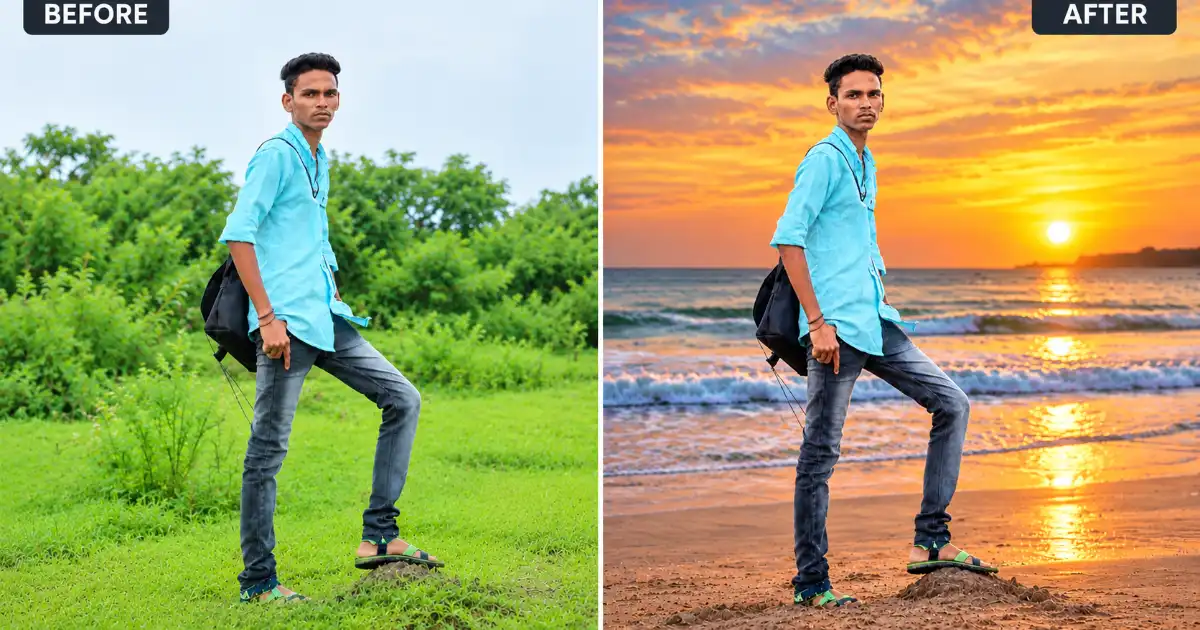
काय बदलतो: फक्त background बदलून समुद्रकिनाऱ्याचा sunset look देतो.
कशासाठी वापरावा: Casual profile photo किंवा outdoor social media photo साठी.
Prompt #2 — डोंगर आणि हिरवळ Background
Change only the background of the uploaded photo to a scenic mountain valley with green hills, soft clouds and natural daylight. Keep the person’s face, identity, pose, clothing and body proportions unchanged. Match the lighting and shadows naturally with the new environment. Maintain a realistic, photorealistic appearance.
काय बदलतो: Indoor किंवा साध्या background ऐवजी डोंगर-निसर्गाचा realistic look देतो.
कशासाठी वापरावा: Travel-style किंवा outdoor profile photo साठी.
Prompt #3 — रात्रीचे City Skyline Background
Replace only the background of the uploaded photo with a modern city skyline at night, featuring subtle bokeh lights. Keep the person’s face, identity, pose, clothing and body proportions unchanged. Add cinematic but natural lighting and realistic reflections and shadows. Maintain sharp facial details and a photorealistic professional appearance.
काय बदलतो: Background ला modern urban/city look देतो.
कशासाठी वापरावा: Instagram, social media किंवा creative profile photo साठी.
Prompt #4 — Professional Studio Background
Change only the background of the uploaded photo to a clean, plain grey studio backdrop. Keep the person’s face, identity, pose, clothing and body proportions unchanged. Remove distracting background elements and add soft, professional studio lighting while preserving natural skin texture and facial details. Maintain a realistic high-resolution appearance.
काय बदलतो: Messy किंवा distracting background काढून clean studio look देतो.
कशासाठी वापरावा: Professional profile, portfolio किंवा business photo साठी.
Prompt #5 — Sky Change
Change only the sky in the uploaded photo to a dramatic golden-hour sky with soft clouds. Keep the person and all foreground elements completely unchanged, including the face, identity, pose, clothing and surroundings. Match the new sky with realistic lighting, shadows and reflections. Maintain natural color grading and a photorealistic appearance.
काय बदलतो: फक्त आकाश बदलतो; foreground आणि व्यक्ती unchanged ठेवण्याचा प्रयत्न करतो.
कशासाठी वापरावा: Outdoor photos अधिक dramatic आणि visually appealing बनवण्यासाठी.
२. Outfit Change
Prompt #6 — Traditional Outfit मध्ये बदल
Change only the outfit of the person in the uploaded photo to traditional Indian ethnic wear in a solid warm color. Keep the person’s face, identity, pose, body proportions and background unchanged. Match the lighting and fabric texture naturally with the existing photo. Maintain a realistic, high-resolution, photorealistic appearance.
काय बदलतो: फक्त कपडे बदलून traditional ethnic look देतो.
कशासाठी वापरावा: सण किंवा पारंपरिक कार्यक्रमांसाठी फोटो तयार करताना.
Prompt #7 — Formal/Business Outfit
Change only the outfit of the person in the uploaded photo to a formal business suit or blazer. Keep the person’s face, identity, pose, body proportions and background unchanged. Add natural fabric folds and realistic lighting consistent with the original photo. Maintain sharp facial details and a photorealistic professional appearance.
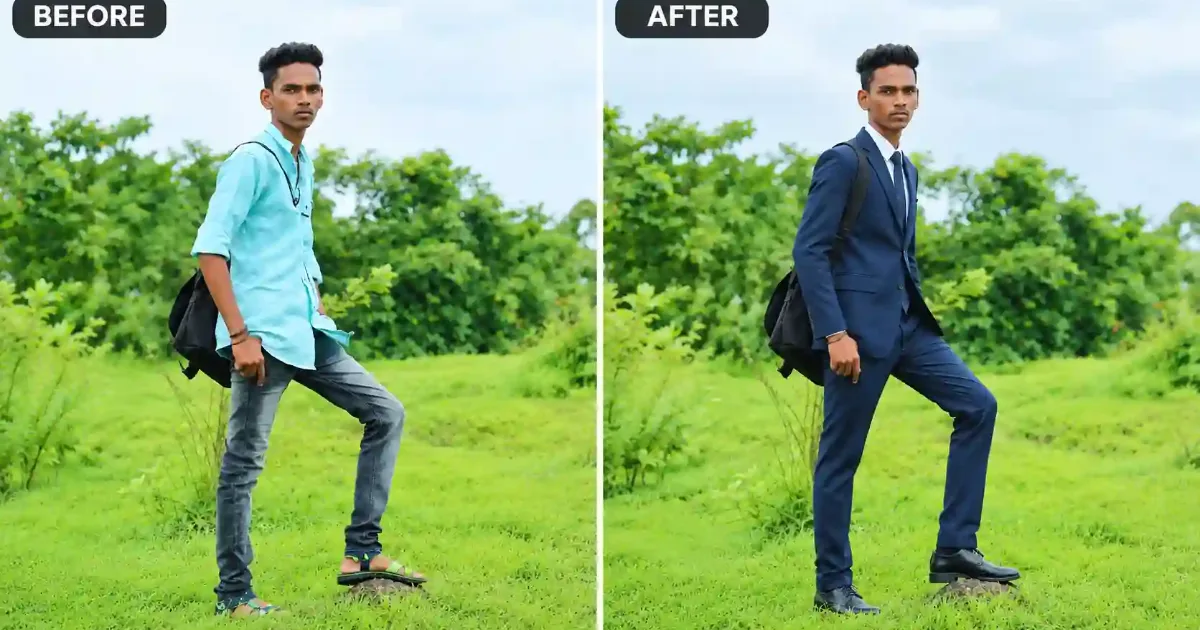
काय बदलतो: Casual कपड्यांना formal/professional लूकमध्ये बदलतो.
कशासाठी वापरावा: LinkedIn profile किंवा office-related फोटोंसाठी.
Prompt #8 — Casual/Streetwear Outfit
Change only the outfit of the person in the uploaded photo to modern casual streetwear such as a jacket and t-shirt. Keep the person’s face, identity, pose, body proportions and background unchanged. Match the lighting, shadows and fabric texture naturally. Maintain a realistic, photorealistic high-resolution appearance.
काय बदलतो: Formal किंवा जुन्या कपड्यांना trendy casual लूक देतो.
कशासाठी वापरावा: Social media किंवा Instagram-style फोटोंसाठी.
Prompt #9 — रंग बदलणे (Outfit Color Change)
Change only the color of the outfit worn by the person in the uploaded photo to a deep maroon shade. Keep the person’s face, identity, pose, body proportions, clothing style and background unchanged. Maintain natural fabric texture, realistic shadows and lighting. Preserve a photorealistic appearance.
काय बदलतो: कपड्यांची style तशीच ठेवून फक्त रंग बदलतो.
कशासाठी वापरावा: एकाच फोटोतून वेगवेगळ्या रंगाचे पर्याय बघण्यासाठी.
Prompt #10 — Festive Indian Wear
Change only the outfit of the person in the uploaded photo to elegant festive Indian wear with subtle embellishments. Keep the person’s face, identity, pose, body proportions and background unchanged. Add realistic fabric texture and natural lighting and shadows matching the original photo. Maintain a photorealistic, high-resolution appearance.
काय बदलतो: साध्या कपड्यांना festive/celebration-appropriate लूक देतो.
कशासाठी वापरावा: सण, वाढदिवस किंवा पार्टी फोटोंसाठी.
३. Traditional / Maharashtrian Look
या categoryमध्ये तुम्हाला अधिक पर्याय हवे असल्यास आमचा Saree AI Prompt हा स्वतंत्र लेखही जरूर बघा.
Prompt #11 — Nauvari Saree Look
Change the outfit of the person in the uploaded photo to a traditional Maharashtrian Nauvari saree, and add a traditional nath and Maharashtrian jewelry. Keep the person’s face, identity, pose, body proportions and background unchanged. Add natural fabric draping, realistic jewelry details, lighting and shadows matching the original photo. Maintain a photorealistic, high-resolution appearance.
काय बदलतो: कपडे बदलून पारंपरिक नऊवारी साडी + दागिन्यांचा लूक देतो.
कशासाठी वापरावा: गणेशोत्सव, गुढीपाडवा किंवा पारंपरिक कार्यक्रमांसाठी.
Prompt #12 — Dhoti-Kurta Maharashtrian Look
Change only the outfit of the person in the uploaded photo to a traditional Maharashtrian dhoti-kurta with a traditional Puneri pagadi (turban). Keep the person’s face, identity, pose, body proportions and background unchanged. Match the lighting and fabric texture naturally with the existing photo. Maintain a realistic, photorealistic appearance.
काय बदलतो: पुरुषांसाठी पारंपरिक धोतर-कुर्ता आणि पुणेरी पगडीचा लूक देतो.
कशासाठी वापरावा: सण किंवा सांस्कृतिक कार्यक्रमांच्या फोटोंसाठी.
Prompt #13 — Cinematic Maharashtrian Portrait
Transform the uploaded photo into a cinematic Maharashtrian-style portrait with traditional Maharashtrian attire, warm golden lighting and a softly blurred rustic background. Keep the person’s face and identity unchanged. Add realistic shadows, film-like color grading and fine detailing. Maintain a photorealistic, high-resolution appearance.
काय बदलतो: संपूर्ण फोटोला cinematic, पारंपरिक सिनेमॅटिक स्टाईलमध्ये रूपांतरित करतो.
कशासाठी वापरावा: Social media साठी artistic, प्रभावी पोर्ट्रेट तयार करण्यासाठी.
Prompt #14 — Traditional Jewelry Addition
Add traditional Maharashtrian jewelry such as a nath, mangalsutra and bangles to the person in the uploaded photo. Keep the person’s face, identity, pose, outfit, body proportions and background unchanged. Maintain realistic lighting, natural shadows and fine jewelry detailing. Preserve a photorealistic, high-resolution appearance.
काय बदलतो: कपडे तसेच ठेवून फक्त पारंपरिक दागिने जोडतो.
कशासाठी वापरावा: आधीच्या फोटोत minimal बदल करून festive touch द्यायचा असल्यास.
Prompt #15 — Festival Background + Traditional Look
Change the outfit of the person in the uploaded photo to appropriate traditional Maharashtrian attire and change the background to a decorated festive setting with warm diyas and floral decorations. Keep the person’s face, identity, pose and body proportions unchanged. Add realistic festive lighting, natural shadows and photorealistic detailing.
काय बदलतो: कपडे आणि background दोन्ही बदलून पूर्ण festive Maharashtrian सीन तयार करतो.
कशासाठी वापरावा: गणेशोत्सव, दिवाळी किंवा गुढीपाडव्यासाठी complete festive फोटो.
४. Photo Enhance & Old Photo Restore
Prompt #16 — General Photo Quality Enhancement
Enhance the overall quality of the uploaded photo by improving sharpness, clarity and apparent detail. Keep the person’s face, identity, pose, clothing, background and all original details unchanged. Do not alter facial features or add new elements. Maintain natural skin texture and a photorealistic appearance.
काय बदलतो: फोटोची sharpness आणि clarity सुधारतो, बाकी सगळं तसंच ठेवतो.
कशासाठी वापरावा: Blurry किंवा low-quality फोटो सुधारण्यासाठी.
Prompt #17 — Low-Light Photo Brightening
Improve the lighting and brightness of the uploaded photo, correcting underexposed or dark areas. Keep the person’s face, identity, pose, clothing and background unchanged. Balance shadows and highlights naturally while preserving realistic colors and skin tones. Maintain a photorealistic appearance.
काय बदलतो: अंधुक किंवा कमी उजेडातील फोटो नैसर्गिकरित्या उजळ करतो.
कशासाठी वापरावा: रात्री किंवा indoor काढलेले फोटो सुधारण्यासाठी.
Prompt #18 — Old Photo Restoration
Restore the uploaded old photo by removing scratches, dust marks, stains and fading. Repair torn or damaged areas naturally and restore faded original colors where applicable. Keep the person’s face, identity, pose and original composition unchanged. Maintain natural facial details and a realistic, high-resolution restored appearance.
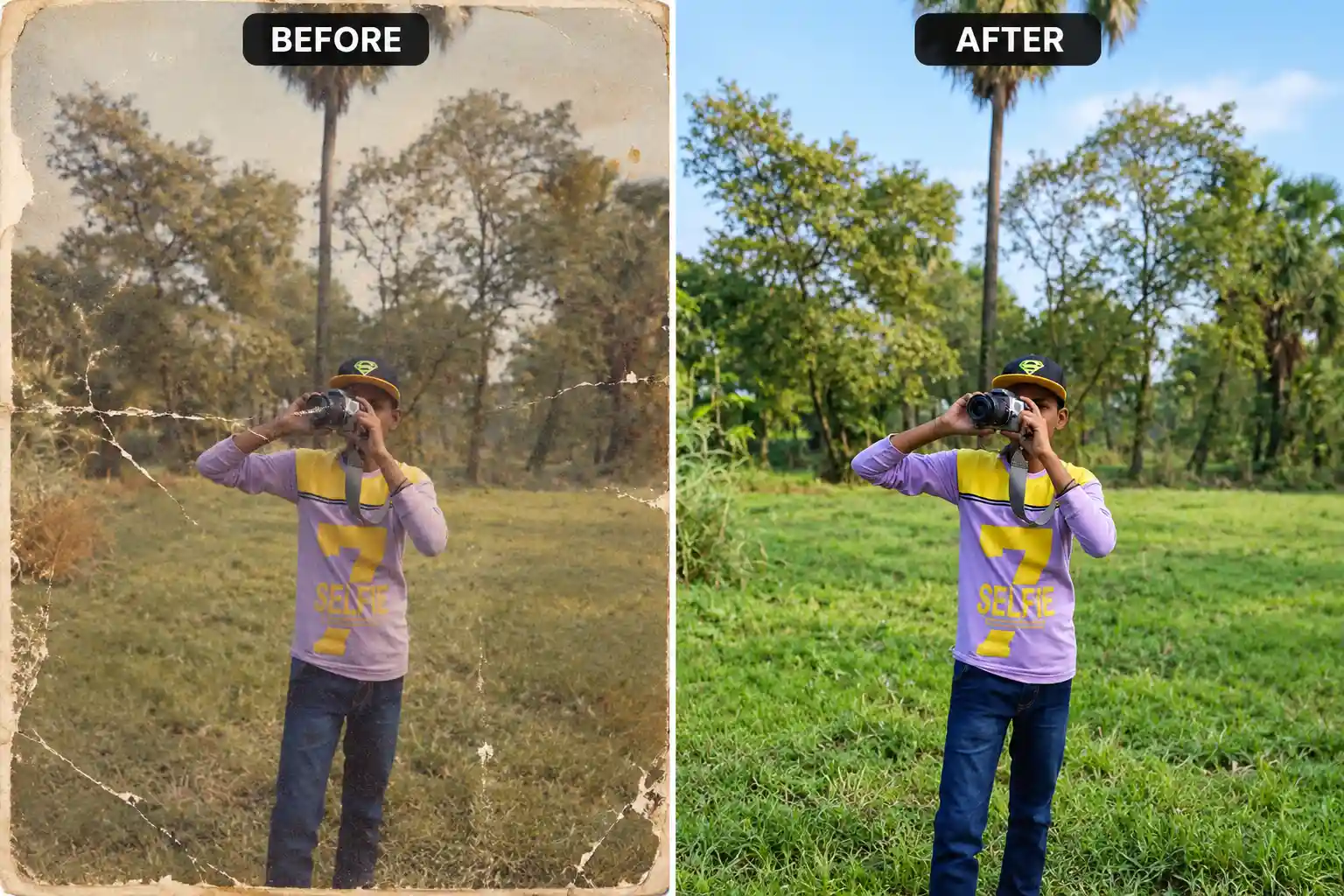
काय बदलतो: जुन्या फोटोवरचे scratches, डाग आणि फिकटपणा दूर करतो.
कशासाठी वापरावा: जुने faded किंवा physically damaged family photos restore करण्यासाठी.
Prompt #19 — Black & White to Color
Convert the uploaded black and white photo into a naturally colorized version. Add plausible and realistic skin tones, clothing colors and background colors based on visible details and contextual cues. Keep the person’s face, identity, pose and original composition unchanged. Preserve the original photographic character while maintaining a photorealistic, high-resolution appearance.
काय बदलतो: Black & white फोटोला नैसर्गिक संभाव्य रंगांमध्ये रूपांतरित करतो. (टीप: मूळ रंग AI ला अचूक माहीत नसतात, त्यामुळे result हा estimated/plausible असतो.)
कशासाठी वापरावा: जुने कुटुंबीयांचे किंवा वडीलधाऱ्यांचे black & white फोटो colorize करण्यासाठी.
Prompt #20 — Missing Detail Reconstruction
Reconstruct missing or damaged parts of the uploaded old photo, including torn edges, damaged areas or severely blurred sections. Rebuild missing facial and background details naturally using the surrounding visual context while keeping the person’s identity as close to the original as possible. Do not introduce unnecessary new elements. Maintain a realistic, high-resolution restored appearance.
काय बदलतो: फोटोतील गहाळ किंवा पूर्णपणे खराब झालेले भाग reconstruct करतो. (हे reconstruction आहे, exact recovery नाही हे लक्षात ठेवा.)
कशासाठी वापरावा: गंभीरपणे खराब झालेले जुने फोटो पुन्हा वापरण्यायोग्य बनवण्यासाठी.
५. Hairstyle & Lighting
Prompt #21 — Hairstyle Change
Change only the hairstyle of the person in the uploaded photo to long wavy hair. Keep the person’s face, identity, facial structure, pose, clothing and background unchanged. Match the existing hair color naturally. Maintain a realistic, photorealistic appearance.
काय बदलतो: फक्त hairstyle बदलतो, चेहरा आणि इतर सर्व घटक तसेच ठेवतो.
कशासाठी वापरावा: नवीन hairstyle try करण्याआधी preview बघण्यासाठी.
Prompt #22 — Hair Color Change
Change only the hair color of the person in the uploaded photo to a natural brown shade. Keep the person’s face, identity, facial structure, hairstyle shape, pose, clothing and background unchanged. Maintain natural hair texture and realistic lighting. Preserve a photorealistic appearance.
काय बदलतो: Hairstyle तशीच ठेवून फक्त केसांचा रंग बदलतो.
कशासाठी वापरावा: नवीन hair color चा प्रयोग सुरक्षितपणे बघण्यासाठी.
Prompt #23 — Beard/Facial Hair Style Change
Change only the facial hair style of the person in the uploaded photo to a neatly trimmed beard. Keep the person’s face, identity, facial structure, pose, clothing and background unchanged. Maintain natural skin texture and realistic lighting. Preserve a photorealistic appearance.
काय बदलतो: फक्त दाढी/मिशीचा स्टाईल बदलतो.
कशासाठी वापरावा: नवीन looks try करण्यासाठी, विशेषतः पुरुषांसाठी.
Prompt #24 — Portrait Lighting Improvement
Improve the lighting on the person’s face in the uploaded photo by adding soft, natural portrait lighting. Keep the person’s face, identity, pose, clothing and background unchanged. Balance shadows and highlights evenly across the face. Maintain a realistic, photorealistic appearance.
काय बदलतो: चेहऱ्यावरील lighting सुधारून अधिक balanced बनवतो.
कशासाठी वापरावा: Flat किंवा असमान lighting असलेले पोर्ट्रेट सुधारण्यासाठी.
Prompt #25 — Golden Hour / Cinematic Lighting
Add a warm, golden-hour cinematic lighting effect to the uploaded photo. Keep the person’s face, identity, pose, clothing and background unchanged. Adjust color tones and shadows naturally while preserving realistic skin tones. Maintain a photorealistic appearance.
काय बदलतो: सामान्य फोटोला warm, cinematic mood देतो.
कशासाठी वापरावा: Social media साठी अधिक आकर्षक आणि visually appealing फोटो बनवण्यासाठी.
६. Face Retouching
Prompt #26 — Natural Skin Retouching
Subtly retouch the skin of the person in the uploaded photo by softening minor imperfections while preserving natural skin texture and pores. Keep the person’s face, identity, facial structure, pose, clothing and background unchanged. Avoid an overly smooth or artificial look. Maintain a realistic, photorealistic appearance.
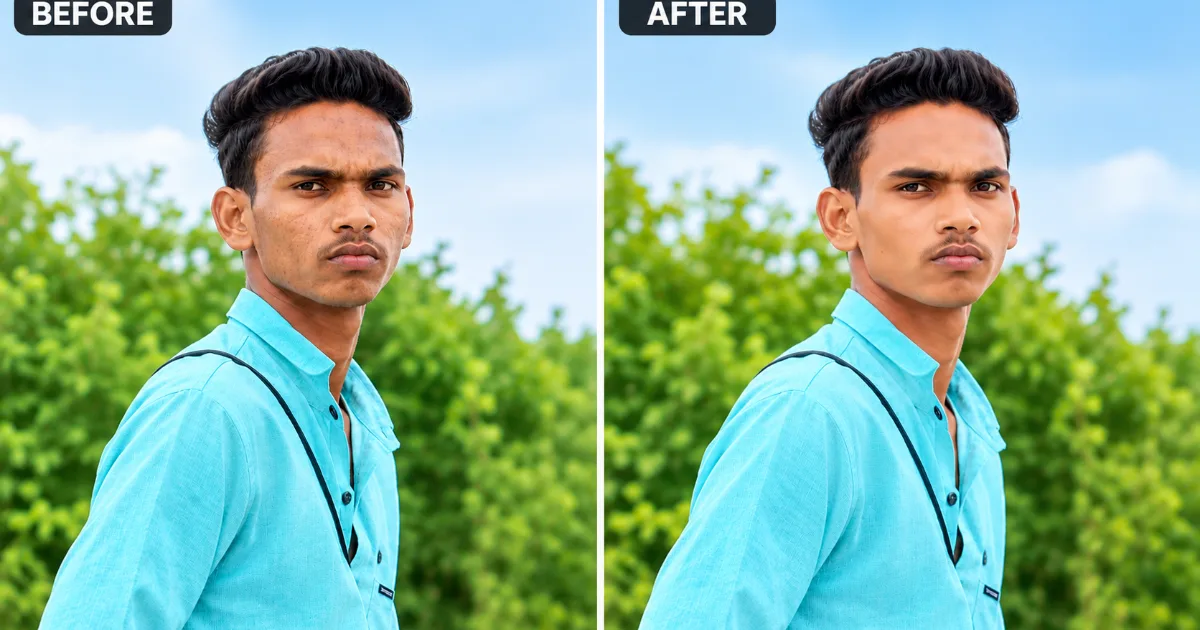
काय बदलतो: किरकोळ त्वचेच्या खाचखळग्यांना सौम्य करतो, पण नैसर्गिक texture कायम ठेवतो.
कशासाठी वापरावा: Profile किंवा social media फोटो साठी subtle polish हवा असताना.
Prompt #27 — Acne / Minor Blemish Removal
Remove temporary acne, spots and minor blemishes from the face of the person in the uploaded photo. Keep the person’s face, identity, facial structure, skin texture, pose, clothing and background unchanged. Do not alter permanent facial features or moles. Maintain a natural, photorealistic appearance.
काय बदलतो: तात्पुरते pimples किंवा छोटे डाग काढतो, permanent features बदलत नाही.
कशासाठी वापरावा: एखाद्या महत्त्वाच्या प्रसंगापूर्वी फोटो लवकर सुधारण्यासाठी.
Prompt #28 — Under-Eye / Tired Look Correction
Subtly reduce dark circles and the tired appearance under the eyes of the person in the uploaded photo. Keep the person’s face, identity, facial structure, skin texture, pose, clothing and background unchanged. Maintain a natural, well-rested look without over-brightening. Preserve a photorealistic appearance.
काय बदलतो: Dark circles आणि थकवा असलेला लूक सौम्यपणे सुधारतो.
कशासाठी वापरावा: रात्रीचा प्रवास किंवा कमी झोपेनंतर काढलेला फोटो सुधारण्यासाठी.
Prompt #29 — Teeth Whitening
Subtly whiten the teeth of the person in the uploaded photo within a natural range. Keep the person’s face, identity, facial structure, smile shape, pose, clothing and background unchanged. Avoid an unnatural, overly bright white. Maintain a realistic, photorealistic appearance.
काय बदलतो: दातांचा रंग नैसर्गिक मर्यादेत उजळ करतो.
कशासाठी वापरावा: Smile असलेले फोटो अधिक आकर्षक बनवण्यासाठी.
Prompt #30 — Natural Portrait Retouching (Balanced Combination)
Apply subtle, balanced retouching to the uploaded photo including gentle skin smoothing, minor blemish reduction and light under-eye correction. Keep the person’s face, identity, facial structure, natural skin texture, pose, clothing and background unchanged. Avoid an artificial or over-edited look. Maintain a natural, photorealistic appearance.
काय बदलतो: वरील छोट्या corrections चं संतुलित combination, पण नैसर्गिक लूक कायम.
कशासाठी वापरावा: एकाच prompt मध्ये overall polished पण realistic पोर्ट्रेट हवा असताना.
AI Photo Editing Prompt वापरण्याची Step-by-Step पद्धत
- स्पष्ट फोटो निवडा: चांगल्या उजेडातला, चेहरा clearly दिसणारा फोटो वापरा.
- Tool उघडा: Gemini, ChatGPT किंवा तुमच्या आवडीचे AI tool उघडा.
- फोटो अपलोड करा: Upload/attach बटणावर क्लिक करून फोटो टाका.
- वरीलपैकी योग्य prompt copy करा: “Copy Prompt” बटण वापरून prompt copy करा आणि tool मध्ये paste करा.
- Result तपासा: चेहरा, ओळख आणि इतर details तशीच आहेत का ते बघा.
- गरज असल्यास पुन्हा प्रयत्न करा: पहिला result समाधानकारक नसल्यास prompt थोडा adjust करून पुन्हा try करा.
AI Photo Editing मध्ये चेहरा किंवा हात खराब आल्यास काय करावे?
AI editing करताना कधीकधी चेहरा बदलतो, हाताची बोटं विचित्र येतात किंवा proportions चुकतात. असं झाल्यास:
- Prompt मध्ये “preserve identity, face and body proportions” हे स्पष्टपणे लिहा (वरील सर्व prompts मध्ये हे आधीच आहे).
- एकाच वेळी जास्त बदल मागू नका. एका prompt मध्ये एकच मुख्य बदल (उदा. फक्त background) ठेवा.
- Result चांगला न आल्यास दुसऱ्या tool वर तोच prompt try करा.
- Negative Prompt वापरून अनावश्यक बदल टाळता येतात. याबद्दल सविस्तर माहितीसाठी आमचा Negative Prompt म्हणजे काय? हा लेख वाचा.
आमचा Actual Testing Experience
वरील 30 AI photo editing prompts आम्ही Gemini, ChatGPT आणि Bing Image Creator या विविध AI image tools वर वेगवेगळ्या प्रकारच्या फोटोंवर प्रत्यक्ष टेस्ट केले. Background आणि Sky Change prompts मध्ये सामान्यतः पहिल्याच प्रयत्नात चांगले आणि अपेक्षित results मिळाले. Outfit आणि Traditional Look categories मध्ये, विशेषतः complicated fabric patterns किंवा जास्त jewelry असलेल्या फोटोंसाठी, कधीकधी दुसरा प्रयत्न करावा लागला.
Face Retouching prompts मध्ये natural आणि subtle result मिळवणे तुलनेने अधिक challenging होते. त्यामुळे या category मधील results काळजीपूर्वक तपासणे आणि आवश्यक असल्यास prompt पुन्हा वापरणे उपयुक्त ठरते.
एकंदरीत, स्पष्ट, high-resolution आणि चांगल्या प्रकाशातील फोटोंवर सर्वच categories मधील prompts अधिक चांगले आणि realistic results देतात. फोटोची quality, lighting आणि subject visibility यांचा final result वर मोठा प्रभाव पडतो.
AI Photo Editing करताना होणाऱ्या 5 सामान्य चुका
- एका prompt मध्ये खूप जास्त बदल एकत्र मागणे (यामुळे result अनपेक्षित येतो)
- Low-quality किंवा धूसर फोटो वापरणे
- “Preserve identity/face” सारख्या instructions न देणे
- पहिल्याच result वर समाधान मानणे, वेगळे tool try न करणे
- Old photo restoration मध्ये “exact original” अपेक्षा ठेवणे (हे reconstruction आहे, हे लक्षात ठेवा)
वारंवार विचारले जाणारे प्रश्न (FAQs)
1.हे prompts मोफत AI tools वर वापरता येतात का?
होय. Gemini, ChatGPT आणि Bing Image Creator सारख्या मोफत AI tools वर हे prompts वापरून पाहता येतात. मात्र प्रत्येक tool ची image editing features आणि capabilities वेगवेगळ्या असू शकतात.
2.फोटो एडिट करताना चेहरा बदलला तर काय करावे?
Prompt मध्ये “preserve face and identity” अशी स्पष्ट सूचना द्या. तरीही चेहऱ्यात अनावश्यक बदल होत असल्यास prompt अधिक specific करा किंवा दुसरे AI image editing tool वापरून पाहा.
3.जुने black & white फोटो colorize केल्यावर रंग खरेच अचूक असतात का?
नाही. AI मूळ रंगांची निश्चित माहिती उपलब्ध नसल्यामुळे संभाव्य (plausible) रंगांचा अंदाज लावते. त्यामुळे colorized फोटोतील रंग हे मूळ फोटोतील वास्तविक रंगांशी नेहमीच अचूक जुळतील असे नाही.
4.एका फोटोवर एकापेक्षा जास्त prompts वापरता येतात का?
होय. मात्र एका वेळी एकच मुख्य बदल करणे अधिक योग्य ठरते. पहिला result तपासल्यानंतर त्यावर पुढचा prompt वापरल्यास प्रत्येक बदलावर अधिक चांगले नियंत्रण ठेवता येते.
निष्कर्ष: AI Photo Editing Prompts चा योग्य वापर
AI Photo Editing हे आता फक्त filters पुरते मर्यादित राहिलेले नाही. योग्य prompts वापरून तुम्ही स्वतःचा फोटो व्यावसायिक दर्जाच्या पातळीवर बदलू शकता. वरील 30 prompts वापरून सुरुवात करा, आणि तुमच्या गरजेनुसार त्यात छोटे बदल करत रहा. Face आणि identity preserve करणाऱ्या instructions नेहमी prompt मध्ये ठेवा, म्हणजे result अधिक विश्वासार्ह येईल.
लेखकाबद्दल
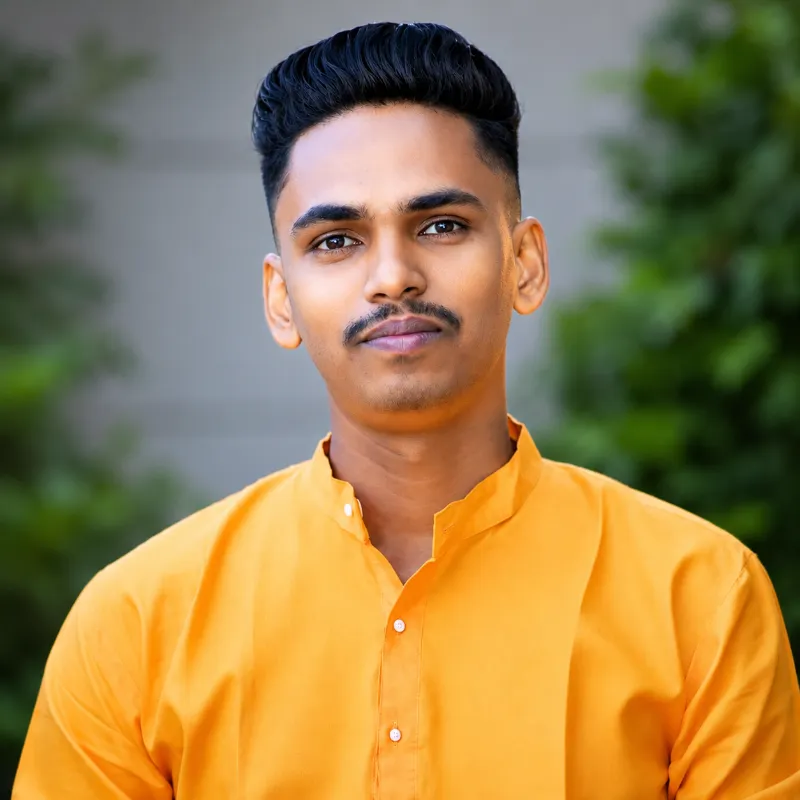
नमस्कार! माझ नाव रविंद्र पारधी, Marathi AI Prompts चा संस्थापक (Founder). गेल्या काही महिन्यांपासून मी विविध AI Image Generator टूल्सवर (Midjourney, Leonardo AI, Google Gemini, DALL-E) सातत्याने सखोल प्रयोग (Testing & Research) करत आहे. माझा मुख्य उद्देश मराठी वाचकांसाठी सोप्या भाषेत AI Prompts, Prompt Engineering आणि प्रॅक्टिकल ChatGPT Tips शेअर करणे हा आहे.
या ब्लॉगवर तुम्हाला AI Prompts संबंधित सर्व मार्गदर्शन मिळेल — साडी AI Prompts पासून ते फोटोग्राफी कीवर्ड्सपर्यंत. मी स्वतः तयार केलेले आणि टेस्ट केलेले रिझल्ट्स मी इथे मांडतो. अधिक माहितीसाठी माझं ‘Founder’ पान नक्की बघा, आणि Facebook/Instagram वर आम्हाला फॉलो करा!
1 thought on “AI Photo Editing Prompts Marathi: फोटो एडिट करण्यासाठी 30 Best Prompts”